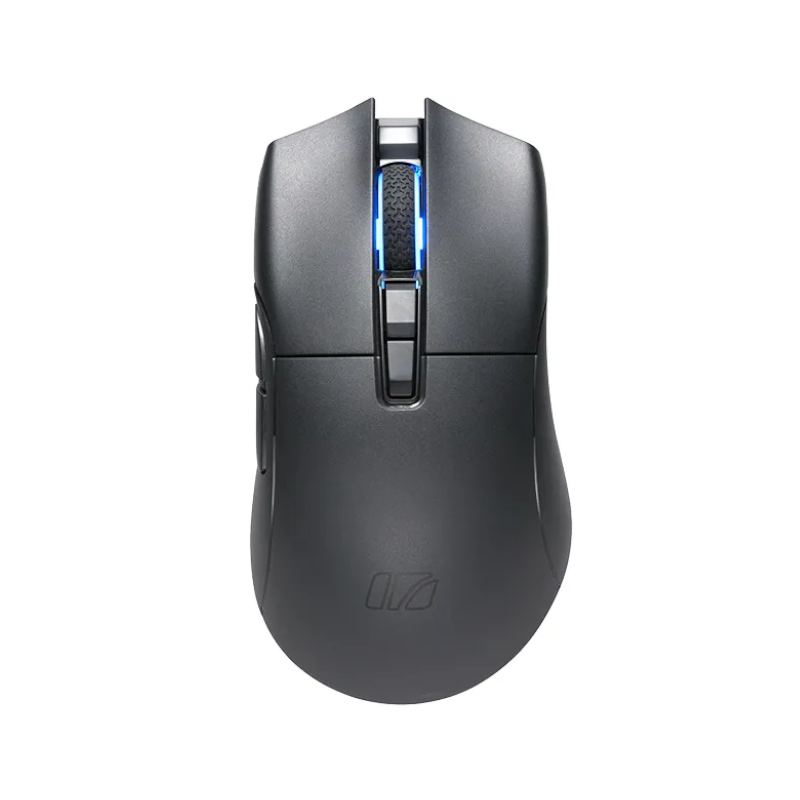


Irocks M31R

Irocks

Irocks M31R
← Back to directory

Key highlights

  • PAW3395 sensor delivers 26,000 DPI
  • Delivers 1000 Hz wireless polling
  • Mouse weighs 66 grams
  • Kailh GM 8.0 switches last 80M clicks
  • Tracks at 650 IPS
  • Handles up to 50G acceleration

Technical overview

The IROCKS M31R is a medium-sized, ergonomic wireless gaming mouse weighing 66g with a PixArt PAW3395 optical sensor offering 26,000 DPI, 650 IPS tracking speed, and 50G acceleration at 1000 Hz polling rate. It features Kailh GM 8.0 mechanical switches rated for 80 million clicks, a TTC Gold encoder, and dimensions of 123 x 66.5 x 40 mm for right-handed precision gaming.

💰 Price comparison

Amazon listings ranked by lowest price. Up to 10 per tab.

Disclosure: Mousebest may earn a commission if you buy through links in this section. As an Amazon Associate, Mousebest earns from qualifying purchases. Affiliate Disclosure

No new listings available yet.

â„šī¸ General Info

Brand

Irocks

Category

Gaming

Model

M31R

Shape

Ergonomic

Release Year

Unknown

Size

Medium

Hand

Right

Sensor

PixArt PAW3395

Sensor Type

Optical

Material

Plastic

Warranty (Years)

Unknown

Onboard Memory Profiles

Unknown

đŸŽ¯ Performance

Max DPI

26000

Polling Rate

1000 Hz

Adjustable DPI

No

Minimum DPI

Unknown

Tracking Speed (IPS)

650 IPS

Acceleration (G)

50 G

🔌 Connection

Connection Type

Wireless

Bluetooth

No

đŸ–ąī¸ Buttons

Programmable Buttons

Unknown

Total Buttons

Unknown

Side Buttons

2

Middle Buttons

2

Main Switches

Kailh GM 8.0

Scroll Wheel Encoder

TTC Gold

🎨 Design

Weight

66 g

Hump Placement

Center

Front Flare

Outward - moderate

Side Curvature

Flat

Width

66.5 mm

Height

40.0 mm

Length

123.0 mm

Cable Length

Unknown

Thumb Rest

No

Ring Finger Rest

No

Tilting Scroll Wheel

No

Thumb Scroll Wheel

No

Extra Weights Included

No

⚡ Power

Battery Life (hours)

Unknown

Wireless Charging

No

Rechargeable Battery

No

Removable Battery

No

✨ Features

DPI Switch Button

No

Profile Switch Button

No

Use While Charging

No

RGB Lighting

No

Gesture Support

No

Community reviews

What Mousebest readers think about Irocks M31R

—

0 reviews

These reviews are meant to capture real ownership feedback, not marketing copy. Users can leave one review per mouse, edit it later, and reviews are filtered for profanity, links, and obvious spam before they appear.

There are no reviews yet, so the first useful hands-on writeup here will set the tone.

No reviews yet

If you have actually used this mouse, add the first review and call out the details that matter: shape comfort, clicks, coating, side buttons, cable or wireless behavior, and who the mouse fits best.

Sign in required

Add your review after you sign in

Reviews are tied to accounts so each person gets one editable review per mouse. That keeps spam down and makes abuse handling much easier.